Flash Naboot — the 5-minute guide
Naboot is the optional custom firmware for the Nabaztag:tag (2006). Your rabbit runs fine without it — but Naboot adds remote, signature-checked over-the-air updates and a modern, mobile-friendly setup page. Flash it once from your phone; after that it updates itself.
1 · Download the firmware
One signed file. After this first flash, every future update is over-the-air — you won't open the rabbit again.
⬇ Download Naboot (signed .sim)Nabaztag:tag v2 · signed by the Naboot key · source on GitHub
2 · Flash it (≈ 5 minutes, from your phone)
1. Config mode. Unplug the rabbit. Hold the head button down and plug the power back in — the four belly lights turn blue.
2. Join its Wi-Fi. On your phone, connect to the open network Nabaztag-XXXX the rabbit broadcasts.
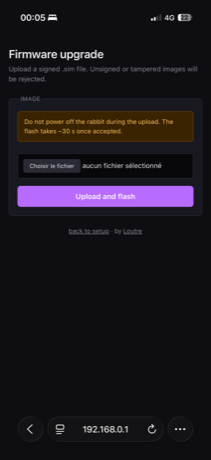
3. Open the page. Browse to http://192.168.0.1 and tap firmware upgrade.
4. Upload the file you just downloaded. Don't unplug during the ~30 s flash. The rabbit reboots on its own.
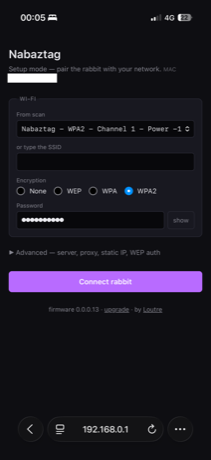
5. Point it at Le Terrier. After it reboots, re-enter config mode (hold the head button while plugging in → belly blue again) and reopen http://192.168.0.1 — it now shows Naboot's setup page. Pick your home Wi-Fi and password, then open “Advanced — server” and set Boot URL host to terrier.cyberloutre.fr. Tap Connect rabbit.
6. Adopt it. It now dials Le Terrier and says its adoption code out loud (like “BRAMBLE 4 2”). Sign up here, then type that code on the /pair page — done. From now on, updates reach it over the air, automatically. (Didn't catch the code? Just unplug and replug — it says it again on every connect until it's adopted.)
Stuck? Quick fixes
My rabbit doesn't say any adoption code
Three things to check: (1) in the setup page, under Advanced → Server, Boot URL host is set to terrier.cyberloutre.fr and you tapped Connect rabbit; (2) it actually joined your Wi-Fi (the belly settles instead of blinking orange forever); (3) give it ~30 s after it connects. Still silent? Unplug and replug — it repeats the code on every connect until it's claimed.
The code is refused on the /pair page
Codes are one-time and expire after 10 minutes. Unplug/replug the rabbit to hear a fresh one, then type it right away. Spaces and capitals don't matter — “bramble 4 2” works just as well as “BRAMBLE42”.
The belly stays orange / blinking after a reboot
That's just Wi-Fi being slow on 2006 hardware — not a brick. Unplug ~10 s and plug back in. If it keeps failing, double-check the Wi-Fi password and that your network is 2.4 GHz (the rabbit can't see 5 GHz bands).
It used to work, now it won't reach the Terrier
Re-enter config mode and confirm Boot URL host is still terrier.cyberloutre.fr and your Wi-Fi credentials are right. A router or DNS change can also break name resolution — the rabbit resolves terrier.cyberloutre.fr through whatever DNS your router hands it, so it needs to be able to look up public names.
Is it risky?
It's the same flash the rabbit already does for any firmware — and it's reversible: if the new setup page ever misbehaves, re-enter config mode and upload the rescue build. If the belly stays orange after a reboot, that's just Wi-Fi being slow on 2006 hardware — unplug ~10 s and plug back in. A rabbit that shows no boot animation at all is the only real concern (recoverable via config mode).
Build it yourself, read the recovery guide, or grab other builds on GitHub.